MoneyTurtle Get the app
New in 2.15 Safe to spend each day →

Know where your money goes.
MoneyTurtle keeps it to itself.

A calm, private expense tracker and budget app for iPhone and Android. Log what you spend, keep an eye on subscriptions, see plain-language insights and follow your net worth over the years — with no accounts, no ads and no tracking of any kind.

Free · No ads · No in-app purchases · iOS 26.5+ · Android 8.0+

Try a theme:
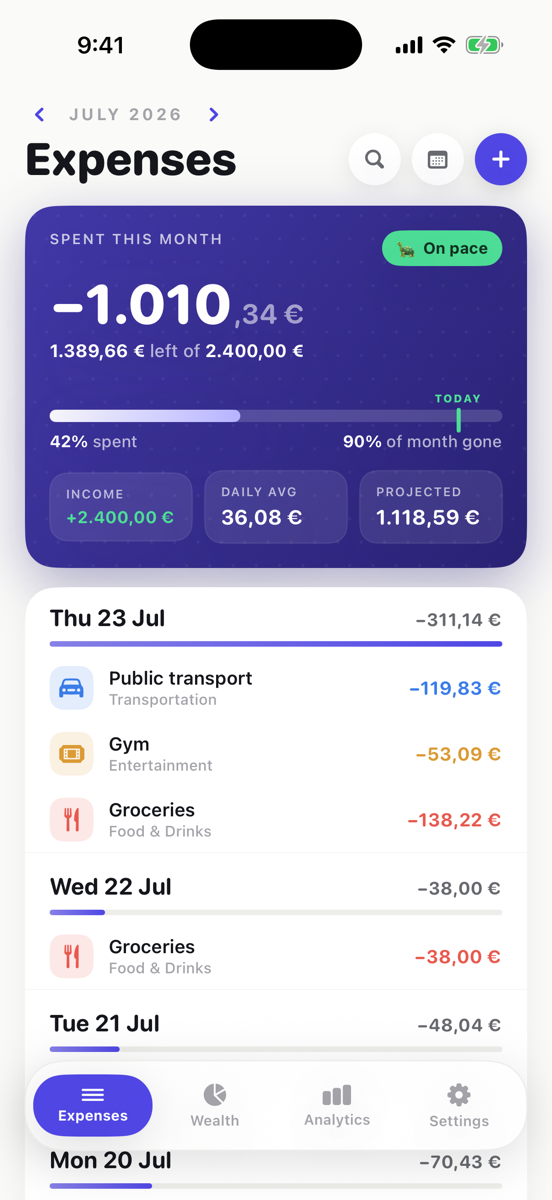
The MoneyTurtle Expenses screen: a month budget hero showing the amount spent, the amount left and a daily average, above a timeline of expenses grouped by day.
0accounts or sign-ups
0ads, trackers or analytics
2native apps, one design
6currencies, 9 themes
What's new

Recently added to MoneyTurtle

Every feature ships on iPhone and Android at the same time, with the same rules and the same wording.

2.15

Safe to spend

What you can spend each day for the rest of the month and still finish within your income — this month's income, minus what you've spent and your subscriptions, divided by the days left. Adding an expense shows where it leaves your day.

See it on Expenses →
2.14

Subscriptions by month

Step through the months and see what each one really cost: a subscription counts from the month you add it, cancelling keeps the months you paid, and price changes keep their history.

See Subscriptions →
2.13

Hot categories

A heads-up when one of your top categories runs ahead of your usual pace for this day of the month — measured against your own last six months, so it stays quiet until something is unusual.

See it on Expenses →
2.9

Insights, without AI

Up to six plain sentences about your month — savings rate, spending against your average, a net-worth streak — worked out on your phone with plain arithmetic.

See Analytics →
2.9

Turtle Journey

Your nest egg measured in years of spending, from Starting to Financial Independence, with thirteen milestones that reward building wealth.

Find your stage →
2.7

Projection calculator

See what investing a fixed amount every month could grow to in Bitcoin, the S&P 500, gold or MSCI World, with live public prices.

Try the calculator →
2.5

Subscriptions

Netflix, the gym, a domain renewal: see what they cost a month and a year and what's due next — and, if you like, log them to Expenses automatically.

See Subscriptions →
2.2

Salary flow

Split each month's income across your accounts as bars, a ring or a flow diagram, and see what's left to assign at a glance.

See Wealth →
Take the tour

Five tabs. Everything about your money.

Pick a tab — or tap the tab bar on the phone — to see what each screen does.

A timeline of what you spend, with a month that adds itself up

Add an expense in a couple of taps. MoneyTurtle groups them by day under a budget hero for the month, and a calendar shades each day by how much you spent.

  • Budget hero — spent, left, daily average and a projected month total.
  • Safe to spend — what you can spend each day and still finish the month within your income, with today's spending on a bar that turns amber when you're close and rose when you're over. Tap it to see how it's worked out.
  • Hot categories — a "Running hot" strip and a flame on rows when a top category runs ahead of its usual pace (+38%, or 2.4× once doubled).
  • A heads-up while you add — pick a hot category and see where this expense takes the month. It never blocks saving.
  • Where an expense leaves your day — "Close to today's limit: €14 left today after this". Never blocks saving either.
  • Calendar heat, search across every month, and your own categories and subcategories — rename one and past expenses follow.
Try it here

Two of the app's tools, right in your browser

The same maths the app uses. Nothing you type here leaves this page.

Projection: invest every month

Dollar-cost averaging — a fixed amount invested at the end of each month, compounding at your expected yearly return.

€200
20 years
10% a year
After 20 years
€143,652
Put in €48,000 Growth €95,652

An illustration with a steady return, not a forecast or financial advice. Markets go down as well as up. In the app, a "10y avg" preset uses ten years of real monthly prices.

Turtle Journey: where are you?

Your nest egg — savings, stocks and crypto, not your home — measured in years of spending it covers.

🐢
Building1.3 years of spending saved
🐣 Start
🐢 1 yr
🐢🐢 5 yrs
🐢🐢🐢 12
🏆 25
€600,000FI number (25× a year)
€90,000more to Growing

Financial Independence at 25 years follows the 4% rule. The app works this out from the balances and spending you've logged, and adds thirteen milestones.

Get the app

Two native apps, one design

Written natively for each platform — SwiftUI on iPhone, Jetpack Compose on Android — and every screen exists on both. The JSON export uses the same format on each.

iPhone

  • Requires iOS 26.5 or later
  • Optional sync through your own private iCloud
  • Face ID or passcode app lock
  • WidgetKit home-screen widgets
  • Readable layout on wide screens and the iPhone Duo
Download on theApp Store

Android

  • Requires Android 8.0 or later
  • Optional daily backup to your own Google Drive
  • Biometric or device-credential app lock
  • Glance home-screen widgets
  • Material 3 design that matches the iPhone app
Get it onGoogle Play

Privacy, in one sentence

MoneyTurtle collects nothing. There are no servers of ours, no accounts, no analytics and no ads — your expenses, subscriptions, categories and net-worth entries live on your device, and only if you turn it on, in your own private iCloud (iPhone) or Google Drive (Android). The one other request the app makes is the Projection screen's download of public market prices, which carries nothing about you.

No data collected No analytics No ads No third-party SDKs No AI Works offline Export any time
Read the full privacy policy
FAQ

Questions people ask

Is MoneyTurtle free?

Yes. MoneyTurtle is free on the App Store and Google Play, with no ads and no in-app purchases.

Do I need an account?

No. There is no sign-up and there are no MoneyTurtle servers. Your data lives on your phone, and only if you turn it on, in your own private iCloud (iPhone) or your own Google Drive (Android).

Does it connect to my bank?

No. You add expenses yourself in a couple of taps. MoneyTurtle never asks for bank logins and never sees your bank.

Does it use AI?

No. Insights such as your savings rate or a net-worth streak are worked out on your phone with plain arithmetic, so the same data always gives the same sentences and nothing leaves your device.

How do sync and backup work?

On iPhone, MoneyTurtle can sync between your devices through your own private iCloud. On Android, it can keep a daily backup in the hidden app-data folder of your own Google Drive — it can't see any other file — and restore it on a new phone. Both are optional.

Which currencies are supported?

Euro (EUR), US dollar (USD), British pound (GBP), Japanese yen (JPY), Chinese yuan (CNY) and UAE dirham (AED).

What is a hot category?

A category that is one of the month's top spending categories and is running ahead of what you usually spend on it by this day of the month — 20% by default. MoneyTurtle compares against your own last six months, so it stays quiet until something is unusual. You can change the threshold and how many top categories to watch, or turn it off.

What is safe to spend?

A daily amount on the Expenses tab — this month's income, minus what you've spent and this month's subscriptions, divided by the days left in the month. Today's spending fills a bar against it. Whatever you don't spend today moves to tomorrow, and going over lowers tomorrow's amount. You can turn it off in Settings.

What is the Turtle Journey?

A path on the Wealth tab that measures your nest egg (savings, stocks and crypto) in years of spending it covers: Starting, Building at 1 year, Growing at 5, Compounding at 12 and Financial Independence at 25 years — the 4% rule. Thirteen milestones reward building wealth along the way. Find your stage.

Can I export my data?

Yes. Everything exports to open JSON at any time, in the same format on iPhone and Android.

MoneyTurtle app icon
Slow and steady builds wealth.

Start tracking today — free, private, and on both platforms.